Garmin Connect IQ

Concentric

A radial watch face built around concentric minute and second rings. Four configurable fields sit in the corners, each with its own progress arc, day and night themes, multi-provider weather, and dedicated prayer-time calculation — set once, glance forever.

  • 80+ data fields
  • 4 fields with progress arcs
  • 4 weather providers
  • AMOLED always-on
  • Prayer times

Available in: English, العربية, Deutsch, Nederlands, Français, Italiano, 日本語, 한국어, Polski, Português, Русский, Español, Türkçe, 简体中文
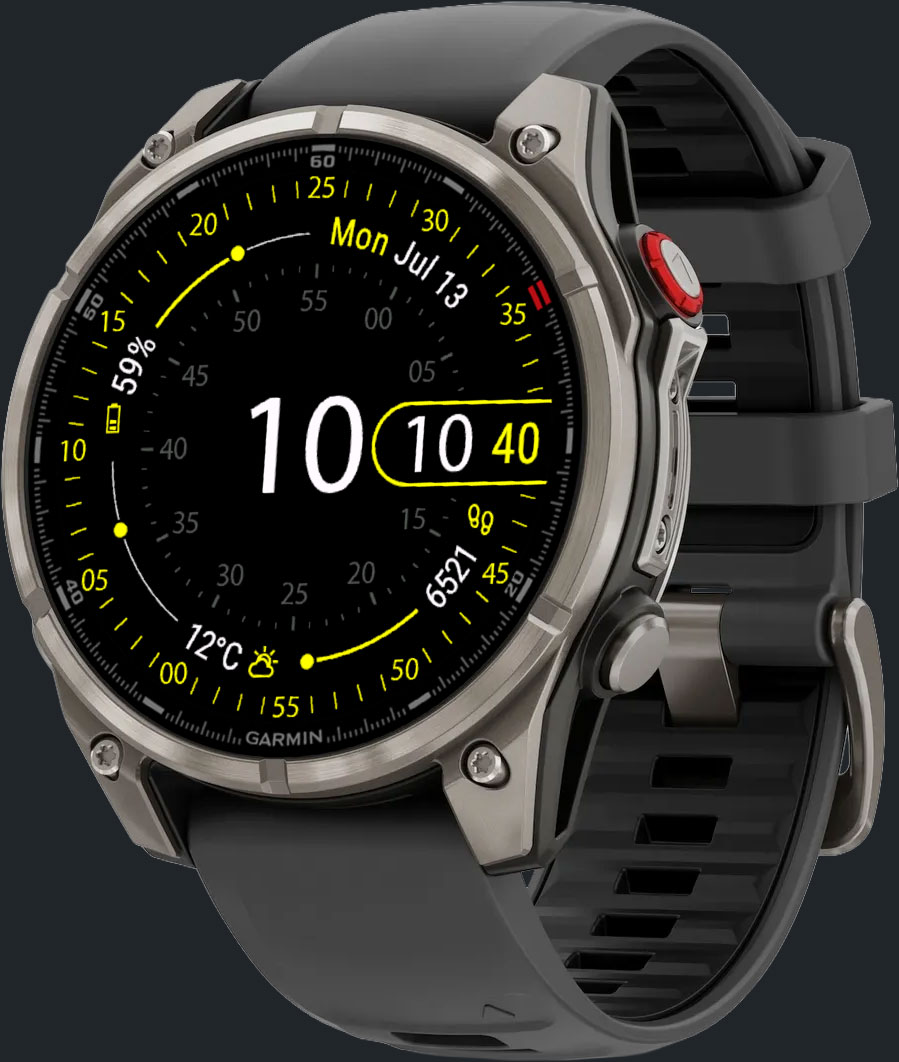
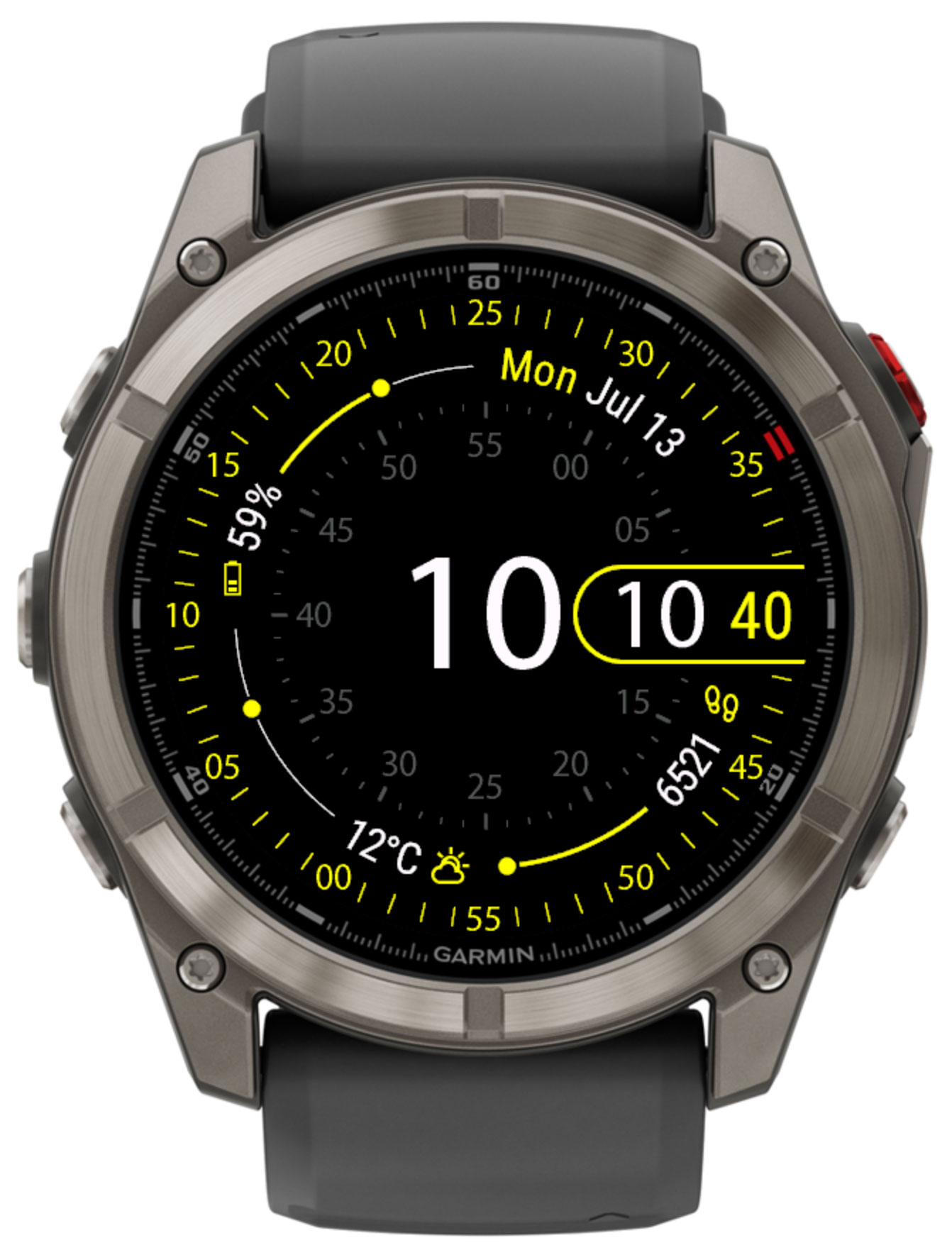
Concentric on a Garmin watch

Overview

Concentric is a data-first watch face for Garmin Connect IQ devices, built around concentric rings: a bold hour/minute display at the center, an inner minute ring around it, and an outer second ring at the edge. Four fields sit in the corners between the rings, each with its own radial progress arc — assign any of over 80 available data points, from steps and heart rate to weather, moon phase and prayer times, so the face always shows exactly what matters to you.

Custom Data Fields

Fill 4 corner fields from over 80 data points — activity, health, weather, sun & moon, prayer times, and more.

Progress Arcs

Each field can show a radial progress arc — steps, floors, battery, heart-rate range, sunrise/sunset position and more — at a glance.

Color-Graded Icons

Give each field a low and a high icon color — the icon smoothly shifts between them as the value moves through its range, so color alone tells you where you stand.

Day & Night Themes

Two independent color themes that switch automatically at sunrise/sunset (or times you set), each with its own background, primary, secondary and value colors.

Multi-provider Weather

Choose Garmin's built-in weather, OpenWeatherMap, QWeather or MET Weather, with automatic background refresh.

Prayer Times

Built-in Namaz calculation with 7 preset methods (Jafari, Karachi, ISNA, MWL, Makkah, Egypt, Tehran) or fully custom parameters.

Third-Party Data

Subscribe to NightScout to show blood glucose readings on the face.

Layout & Themes

Concentric day theme layout

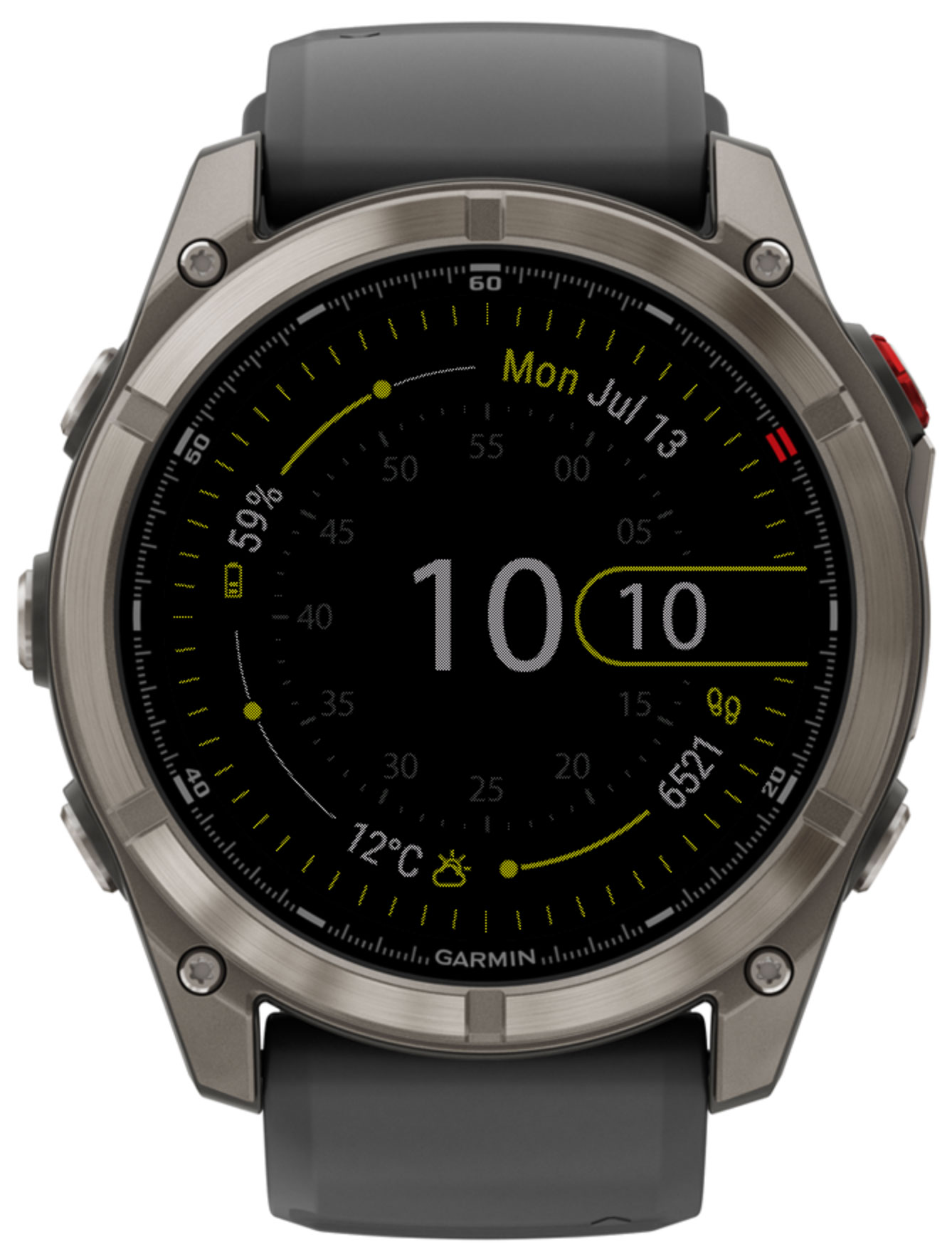
The hour and minute are shown in the center. Around them, an inner ring marks the minutes, and an outer ring at the edge marks the seconds. Between the two rings, four fields sit in the corners — top-right, bottom-right, bottom-left and top-left — each rendered as a value with an icon and, where the data supports it, a radial progress arc. Tapping a corner field launches its associated Garmin complication, if the watch and connection allow it.

  • 4 corner fields Top-right, bottom-right, bottom-left and top-left — any single-value data point, with its own low/high icon color.
  • Progress arcs Most fields draw a radial arc showing where today's value sits within its range — see the badge on each field below.
Day & night themes

Concentric automatically switches between two independent color themes at sunrise and sunset (using your saved GPS location), or at custom times you define. Each theme has its own set of colors:

Color Description
BackgroundThe face background color.
PrimaryAccent color used for the second ring, the hour/minute digit outline, and field icons by default.
SecondaryAccent color used for the inner minute ring.
ValuesColor used for the hour/minute digits and field value text.
Color-graded field icons

Every corner field has its own Low value color and High value color. As the field's current value moves through its range — from the low end toward the high end of whatever it's tracking — the icon smoothly blends from the low color to the high color, instead of jumping between two fixed states. The further along the range, the closer the icon gets to the high color.

This turns the icon itself into a second, at-a-glance indicator alongside the progress arc — useful for anything with a meaningful range:

  • Heart rate: a calm color at rest, shifting toward an alert color as your pulse climbs.
  • Battery: a warning color when low, blending toward your normal color as it charges.
  • Weather, pressure, humidity and similar fields: a gradual shift across today's recorded range, so an unusual reading stands out by color alone.

By default, the low color is your theme's Primary color and the high color matches the low color (no gradient) — set both independently per field in Settings to enable the effect.

Always-On Display
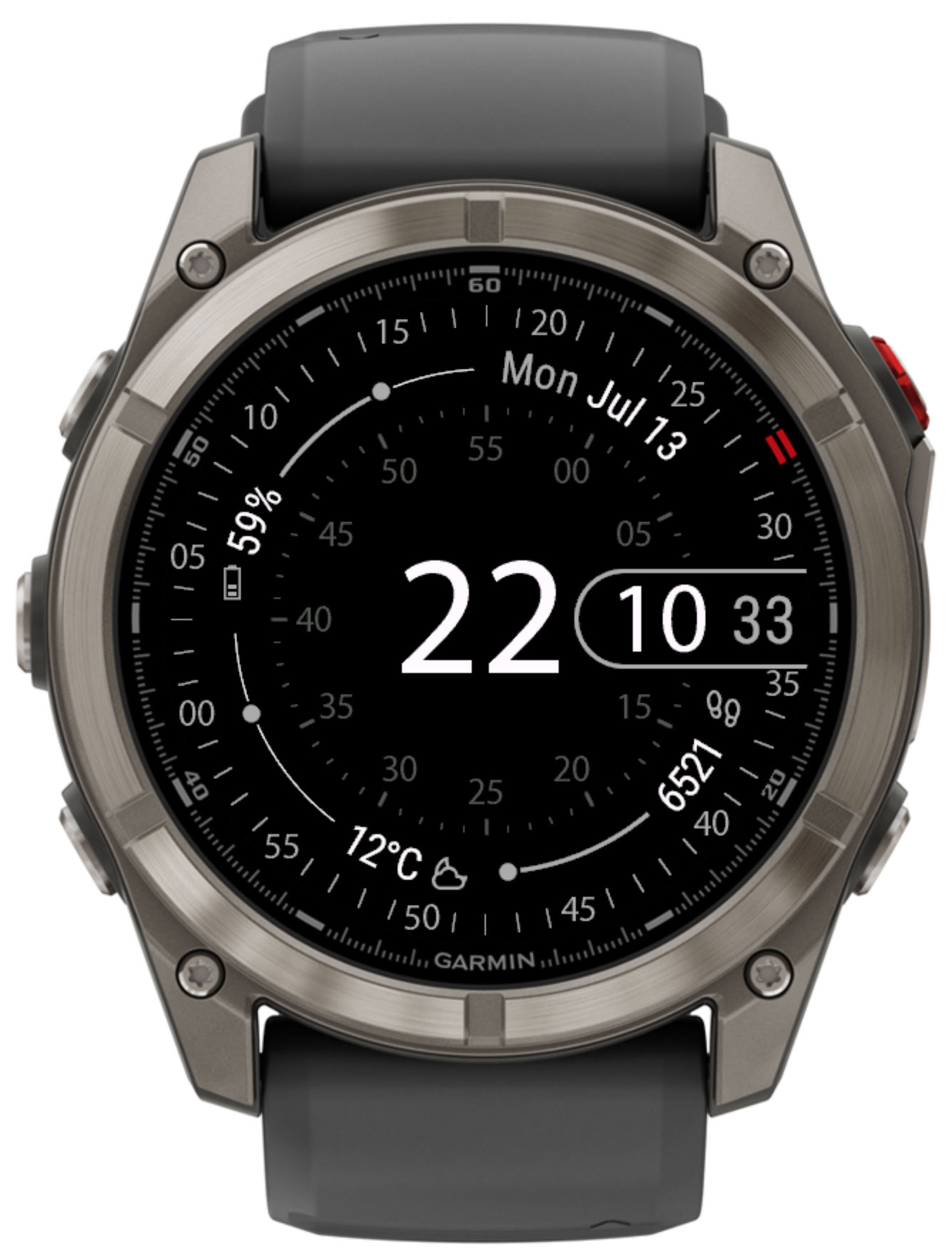
Concentric in always-on display mode

On AMOLED devices with an always-on / low-power display mode, you can choose how much of the face stays visible:

OptionBehaviour
OffAn empty screen is shown in low-power mode, to save the most battery.
Only timeOnly the time is shown while the watch is in low-power mode.
Show all fieldsThe full face, with all rings and fields, remains visible in low-power mode.

Data Fields

Each of the 4 corner fields can be set independently, from Garmin Connect IQ app settings, to any of the values below.

  • Current dateThe current system date, format and week-start configurable in Settings.
    All Concentric devices.
  • Custom time 2The current time for a second time zone, configured in settings.
    All Concentric devices.
  • ⭐️Custom time 3The current time for a third time zone, configured in settings.
    All Concentric devices.
  • ⭐️ISO week numberISO week number. progress arc
    All Concentric devices.
  • ⭐️Time counterDays elapsed since (or until) a date you configure.
    All Concentric devices.
  • ⭐️AM/PM indicator
    All Concentric devices.

  • Battery in %The remaining battery life as a percentage. progress arc
    All Concentric devices.
  • ⭐️Battery in daysThe estimated remaining battery life in days, if available. progress arc
    Requires a newer sensor/API generation (roughly 2019+ models). Not available on: Fenix 5 Plus, Fenix 5S Plus, Fenix 5X Plus, Forerunner 645 Music, D2 Air, Vívoactive 3 Music, Venu (Mercedes-Benz Collection).
  • ⭐️Solar sensor chargeSolar charging contribution, on solar-capable devices. progress arc
    Requires a newer sensor/API generation (roughly 2019+ models). Not available on: Fenix 5 Plus, Fenix 5S Plus, Fenix 5X Plus, Forerunner 645 Music, D2 Air, Vívoactive 3 Music, Venu (Mercedes-Benz Collection).
  • ⭐️IlluminanceAmbient light level from the solar sensor, if available. progress arc
    Requires a newer sensor/API generation (roughly 2019+ models). Not available on: Fenix 5 Plus, Fenix 5S Plus, Fenix 5X Plus, Forerunner 645 Music, D2 Air, Vívoactive 3 Music, Venu (Mercedes-Benz Collection).

  • ⭐️SunriseThe next sunrise time for your location. progress arc
    All Concentric devices.
  • ⭐️SunsetThe next sunset time for your location. progress arc
    All Concentric devices.
  • Sunrise or sunset (nearest)Whichever of sunrise/sunset comes next. progress arc
    All Concentric devices.
  • ⭐️Time to sunrise progress arc
    All Concentric devices.
  • ⭐️Time to sunset progress arc
    All Concentric devices.
  • ⭐️Time to sunrise or sunset (nearest) progress arc
    All Concentric devices.
  • ⭐️Moon age in daysPosition within the 29.53-day lunar cycle, with moon-phase icon. progress arc
    All Concentric devices.
  • ⭐️Moon illumination in percent progress arc
    All Concentric devices.

  • ⭐️AlarmNumber of alarms set on the device.
    All Concentric devices.
  • ⭐️ConnectionWhether a communication channel is currently connected.
    All Concentric devices.
  • ⭐️NotificationsNumber of active notifications.
    All Concentric devices.
  • ⭐️Do not disturb
    All Concentric devices.
  • Current statusCombined connection, alarm and notification indicator.
    All Concentric devices.
  • ⭐️Watch sensor temperature
    All Concentric devices.

  • StepsSteps since midnight. progress arc
    All Concentric devices.
  • ⭐️Steps goalToday's step goal, with progress toward it. progress arc
    All Concentric devices.
  • ⭐️Steps goal leftSteps remaining to reach today's goal. progress arc
    All Concentric devices.
  • ⭐️This week stepsSteps since the start of the week. progress arc
    All Concentric devices.
  • DistanceDistance covered since midnight. progress arc
    All Concentric devices.
  • ⭐️This week distanceDistance covered since the start of the week. progress arc
    All Concentric devices.
  • Climbed floorsFloors climbed today. progress arc
    Requires a barometric altimeter. Not available on: Forerunner 55, Forerunner 245, Forerunner 245 Music.
  • Descended floorsFloors descended today. progress arc
    Requires a barometric altimeter. Not available on: Forerunner 55, Forerunner 245, Forerunner 245 Music.
  • ⭐️Floors goalToday's floors goal, with progress toward it. progress arc
    Requires a barometric altimeter. Not available on: Forerunner 55, Forerunner 245, Forerunner 245 Music.
  • ⭐️Floors goal leftFloors remaining to reach today's goal. progress arc
    Requires a barometric altimeter. Not available on: Forerunner 55, Forerunner 245, Forerunner 245 Music.
  • ⭐️This week climbed floorsFloors climbed since the start of the week. progress arc
    Requires a barometric altimeter. Not available on: Forerunner 55, Forerunner 245, Forerunner 245 Music.
  • ⭐️Climbed metersVertical meters climbed today. progress arc
    Requires a barometric altimeter. Not available on: Forerunner 55, Forerunner 245, Forerunner 245 Music.
  • ⭐️Descended metersVertical meters descended today. progress arc
    Requires a barometric altimeter. Not available on: Forerunner 55, Forerunner 245, Forerunner 245 Music.
  • ⭐️AltitudeCurrent altitude above sea level. Progress shows position within today's recorded range. progress arc
    Requires a barometric altimeter. Not available on: Forerunner 55, Forerunner 245, Forerunner 245 Music.

  • CaloriesCalories burned today, against an estimated daily goal. progress arc
    All Concentric devices.
  • ⭐️This week caloriesCalories burned since the start of the week. progress arc
    All Concentric devices.
  • ⭐️Active caloriesCalories burned during activity today. progress arc
    All Concentric devices.
  • ⭐️This week active caloriesActive calories since the start of the week. progress arc
    All Concentric devices.
  • ⭐️Summary day active minutesTotal active minutes for today. progress arc
    All Concentric devices.
  • ⭐️Summary week active minutesTotal active minutes for the week. progress arc
    All Concentric devices.
  • ⭐️Move bar levelMove-alert bar level, 0–5. progress arc
    All Concentric devices.

  • ⭐️This week cycling distanceFrom watch-recorded activities only.
    Requires a newer sensor/API generation (roughly 2019+ models). Not available on: Fenix 5 Plus, Fenix 5S Plus, Fenix 5X Plus, Forerunner 645 Music, D2 Air, Vívoactive 3 Music, Venu (Mercedes-Benz Collection).
  • ⭐️This week cycling time
    Requires a newer sensor/API generation (roughly 2019+ models). Not available on: Fenix 5 Plus, Fenix 5S Plus, Fenix 5X Plus, Forerunner 645 Music, D2 Air, Vívoactive 3 Music, Venu (Mercedes-Benz Collection).
  • ⭐️This week running distance
    Requires a newer sensor/API generation (roughly 2019+ models). Not available on: Fenix 5 Plus, Fenix 5S Plus, Fenix 5X Plus, Forerunner 645 Music, D2 Air, Vívoactive 3 Music, Venu (Mercedes-Benz Collection).
  • ⭐️This week running time
    Requires a newer sensor/API generation (roughly 2019+ models). Not available on: Fenix 5 Plus, Fenix 5S Plus, Fenix 5X Plus, Forerunner 645 Music, D2 Air, Vívoactive 3 Music, Venu (Mercedes-Benz Collection).
  • ⭐️This week swimming distance
    Requires a newer sensor/API generation (roughly 2019+ models). Not available on: Fenix 5 Plus, Fenix 5S Plus, Fenix 5X Plus, Forerunner 645 Music, D2 Air, Vívoactive 3 Music, Venu (Mercedes-Benz Collection).
  • ⭐️This week swimming time
    Requires a newer sensor/API generation (roughly 2019+ models). Not available on: Fenix 5 Plus, Fenix 5S Plus, Fenix 5X Plus, Forerunner 645 Music, D2 Air, Vívoactive 3 Music, Venu (Mercedes-Benz Collection).
  • ⭐️This week strength time
    Requires a newer sensor/API generation (roughly 2019+ models). Not available on: Fenix 5 Plus, Fenix 5S Plus, Fenix 5X Plus, Forerunner 645 Music, D2 Air, Vívoactive 3 Music, Venu (Mercedes-Benz Collection).
  • ⭐️Surface intervalTime since your last dive activity. When this slot's no-fly alert is enabled in Settings, it temporarily switches to a fly-safe countdown after diving. progress arc
    Requires a newer sensor/API generation (roughly 2019+ models). Not available on: Fenix 5 Plus, Fenix 5S Plus, Fenix 5X Plus, Forerunner 645 Music, D2 Air, Vívoactive 3 Music, Venu (Mercedes-Benz Collection).

  • Current heart rate progress arc
    All Concentric devices.
  • ⭐️Resting heart rate
    All Concentric devices.
  • ⭐️Seven day average resting heart rate
    Requires a newer sensor/API generation (roughly 2019+ models). Not available on: Fenix 5 Plus, Fenix 5S Plus, Fenix 5X Plus, Forerunner 645 Music, D2 Air, Vívoactive 3 Music, Venu (Mercedes-Benz Collection).
  • ⭐️Respiration rateBreaths per minute.
    Requires a newer sensor/API generation (roughly 2019+ models). Not available on: Fenix 5 Plus, Fenix 5S Plus, Fenix 5X Plus, Forerunner 645 Music, D2 Air, Vívoactive 3 Music, Venu (Mercedes-Benz Collection).
  • ⭐️Oxygen saturation progress arc
    Requires a newer sensor/API generation (roughly 2019+ models). Not available on: Fenix 5 Plus, Fenix 5S Plus, Fenix 5X Plus, Forerunner 645 Music, D2 Air, Vívoactive 3 Music, Venu (Mercedes-Benz Collection).
  • ⭐️Weight
    All Concentric devices.
  • BMIBody Mass Index, calculated from weight and height.
    All Concentric devices.
  • ⭐️Body Battery progress arc
    Requires a newer sensor/API generation (roughly 2019+ models). Not available on: Fenix 5 Plus, Fenix 5S Plus, Fenix 5X Plus, Forerunner 645 Music, D2 Air, Vívoactive 3 Music, Venu (Mercedes-Benz Collection).
  • ⭐️Stress progress arc
    Requires a newer sensor/API generation (roughly 2019+ models). Not available on: Fenix 5 Plus, Fenix 5S Plus, Fenix 5X Plus, Forerunner 645 Music, D2 Air, Vívoactive 3 Music, Venu (Mercedes-Benz Collection).
  • ⭐️Time to recoveryHours until recovered from your last activity. progress arc
    Requires a newer sensor/API generation (roughly 2019+ models). Not available on: Fenix 5 Plus, Fenix 5S Plus, Fenix 5X Plus, Forerunner 645 Music, D2 Air, Vívoactive 3 Music, Venu (Mercedes-Benz Collection).
  • ⭐️VO2 max (cycling) progress arc
    Requires a newer sensor/API generation (roughly 2019+ models). Not available on: Fenix 5 Plus, Fenix 5S Plus, Fenix 5X Plus, Forerunner 645 Music, D2 Air, Vívoactive 3 Music, Venu (Mercedes-Benz Collection).
  • ⭐️VO2 max (running) progress arc
    Requires a newer sensor/API generation (roughly 2019+ models). Not available on: Fenix 5 Plus, Fenix 5S Plus, Fenix 5X Plus, Forerunner 645 Music, D2 Air, Vívoactive 3 Music, Venu (Mercedes-Benz Collection).
  • ⭐️Blood glucose (NightScout)Requires a configured NightScout URL. See Third-Party Data below.
    All Concentric devices.

  • Current weatherCondition icon and temperature. Progress shows today's position between the recorded low and high. progress arc
    All Concentric devices.
  • ⭐️High/low temperature
    All Concentric devices.
  • ⭐️Feels likeWind chill or heat index.
    All Concentric devices.
  • ⭐️Precipitation chanceNot available for Garmin weather. progress arc
    All Concentric devices.
  • ⭐️Dew point
    All Concentric devices.
  • ⭐️Humidity progress arc
    All Concentric devices.
  • ⭐️AQINot available for Garmin weather. progress arc
    All Concentric devices.
  • ⭐️Ambient pressure, hPaProgress shows position within the sensor's recorded range. progress arc
    All Concentric devices.
  • ⭐️Ambient pressure, inHg progress arc
    All Concentric devices.
  • ⭐️Ambient pressure, mmHg progress arc
    All Concentric devices.
  • ⭐️Wind, Beaufort scaleWind speed and direction icon, Beaufort scale.
    All Concentric devices.
  • ⭐️Wind, km/h
    All Concentric devices.
  • ⭐️Wind, knot
    All Concentric devices.
  • ⭐️Wind, m/s
    All Concentric devices.
  • ⭐️Wind, mph
    All Concentric devices.

  • ⭐️Hydration PROFluid intake tracked via a supported hydration sensor/app. progress arc
    Requires a newer sensor/API generation (roughly 2021+ models). Not available on: Venu, Venu (Mercedes-Benz Collection), Legacy Hero (Captain Marvel), Legacy Hero (First Avenger), Legacy Saga (Darth Vader), Legacy Saga (Rey), Fenix 5 Plus, Fenix 5S Plus, Fenix 5X Plus, Fenix 6, Fenix 6 Pro, Fenix 6S, Fenix 6S Pro, Fenix 6X Pro, Enduro, Descent Mk2, Descent Mk2 S, MARQ Adventurer, MARQ Athlete, MARQ Aviator, MARQ Captain, MARQ Commander, MARQ Driver, MARQ Expedition, MARQ Golfer, Forerunner 55, Forerunner 245, Forerunner 245 Music, Forerunner 645 Music, Forerunner 745, Forerunner 945, Forerunner 945 LTE, D2 Air, Vívoactive 3 Music, Vívoactive 4, Vívoactive 4S.
  • ⭐️Hydration PRO goal left progress arc
    Requires a newer sensor/API generation (roughly 2021+ models). Not available on: Venu, Venu (Mercedes-Benz Collection), Legacy Hero (Captain Marvel), Legacy Hero (First Avenger), Legacy Saga (Darth Vader), Legacy Saga (Rey), Fenix 5 Plus, Fenix 5S Plus, Fenix 5X Plus, Fenix 6, Fenix 6 Pro, Fenix 6S, Fenix 6S Pro, Fenix 6X Pro, Enduro, Descent Mk2, Descent Mk2 S, MARQ Adventurer, MARQ Athlete, MARQ Aviator, MARQ Captain, MARQ Commander, MARQ Driver, MARQ Expedition, MARQ Golfer, Forerunner 55, Forerunner 245, Forerunner 245 Music, Forerunner 645 Music, Forerunner 745, Forerunner 945, Forerunner 945 LTE, D2 Air, Vívoactive 3 Music, Vívoactive 4, Vívoactive 4S.

  • ⭐️The next namazName and time of the next prayer, calculated from your location. See Prayer Times below. progress arc
    All Concentric devices.
  • ⭐️Remaining time until the next namaz progress arc
    All Concentric devices.

Weather

Weather data fields on Concentric

Weather fields (current conditions, high/low temperature, precipitation, humidity, AQI, pressure and wind) can be sourced from any of four providers:

ProviderNotes
GarminBuilt-in, no API key required. Precipitation chance and AQI are not available.
OpenWeatherMapRequires a free personal API key, entered in settings.
QWeatherRequires a free API key. Useful in regions with better QWeather coverage.
MET WeatherData from the Norwegian Meteorological Institute, no API key required.

The update interval is configurable in 15-minute steps up to 3 hours, and sunrise/sunset can optionally be taken from the weather provider instead of being calculated locally. Weather requires internet connectivity through your paired phone.

Prayer Times

Concentric can calculate namaz (salah) times directly from your GPS location, with no internet connection required, and display the next prayer or a countdown to it as a data field.

From the on-watch settings menu, pick one of 7 preset calculation methods:

Method
Jafari
Karachi
ISNA
MWL (Muslim World League)
Makkah
Egypt
Tehran

Advanced users can instead enter custom calculation parameters (Fajr/Isha angles, Maghrib offset, and high-latitude adjustment) as a raw comma-separated value through the Garmin Connect app or Garmin Express.

Third-Party Data

Concentric can pull data from third-party sources and show it directly as a face field:

NightScout

Displays blood glucose readings pulled from your NightScout instance, in mg/dL or mmol/L.

Settings

All settings are managed through the Garmin Connect IQ mobile app or Garmin Express on desktop. Open the app list, find Concentric, and tap Settings. Most devices also offer a shorter settings menu directly on the watch (hold the settings button while the face is showing).

General

SettingOptionsDescription
Values font size 7–13 Size of the field value text.
Seconds font size 7–13 Size of the second-ring numbers.
Date format Dec 31, 31 Dec, 12/31, 31.12 Controls how the date field is formatted.
Date language System / English Language used for day-of-week and month abbreviations.
Week start System / Sunday / Monday First day of the week, used by the ISO week number field.
Allow long press On / Off Enables tapping a corner field to launch its complication (System 6 and touch screen required).
Screen long press action None, a complication, randomize accent color, switch background, or switch AOD mode Action triggered by a long press on the center of the face.

Location

SettingValuesDescription
📍 Get system location On / Off When On, the watch's own GPS coordinates are used automatically — needed for sunrise/sunset, prayer times, and some weather providers.
📍 Latitude / Longitude Decimal degrees Manual coordinates, used only when auto-location is disabled.

Day & Night Themes

SettingDescription
☀️ Day start time / 🌙 Night start timeCustom h:m start time for each theme; leave empty to switch automatically at sunrise/sunset.
🎨 Background / Primary / Secondary / Values colorSet independently for the day and night theme.
🎨 Low value color / High value colorPer corner field — set the two ends of the icon's color gradient. The icon smoothly shifts from the low color to the high color as the field's value moves through its range. Same by default (no gradient) until you set them differently.

Weather

SettingOptionsDescription
🌦️ Weather provider Garmin, OpenWeatherMap, QWeather, MET Weather Source used for all weather-related data fields.
🌦️ Weather API key Text Required for OpenWeatherMap and QWeather.
🌦️ Weather update interval 0:15 – 3:00, in 15-minute steps How often weather data is refreshed in the background.
☀️ Sunrise/Sunset from Weather provider On / Off Uses the weather provider's sunrise/sunset instead of a local astronomical calculation.

Fields

SettingDescription
Field 1 – 4 (top-right, bottom-right, bottom-left, top-left)Assigns a data source (see Data Fields) to each corner.
No-fly time alertChoose one field slot to temporarily switch to a fly-safe countdown after a logged dive, following DAN/PADI/NAUI guidance (12–24h depending on dive profile).

Prayer Times

SettingDescription
Namaz time settingsOne of 7 preset calculation methods (on-watch menu) or a custom parameter string (phone app / Garmin Express).

Third-Party Data

SettingDescription
NightScout URLBase URL of your NightScout instance, used by the blood glucose field.
Glucose unitsmg/dL or mmol/L.

Always-On Display

SettingOptions
Fields in AOD (only for AMOLED)Off, Only time, Show all fields

Device Compatibility

Concentric automatically builds the right layout for your specific watch model — a standard layout, an AMOLED-optimised layout, or a trimmed layout for older, memory-constrained devices. Supported device families:

Approach

  • S50
  • S70 42mm
  • S70 47mm

D2

  • Air
  • Air X10
  • Mach 1

Descent

  • Mk2
  • Mk2 S
  • Mk3 43mm
  • Mk3i 51mm

Enduro

  • Enduro
  • Enduro 3

Epix

  • 2
  • 2 Pro 42mm
  • 2 Pro 47mm
  • 2 Pro 51mm

Fenix

  • 5 Plus
  • 5S Plus
  • 5X Plus
  • 6
  • 6 Pro
  • 6S
  • 6S Pro
  • 6X Pro
  • 7
  • 7 Pro
  • 7 Pro (No WiFi)
  • 7S
  • 7S Pro
  • 7X
  • 7X Pro
  • 7X Pro (No WiFi)
  • 8 43mm
  • 8 47mm
  • 8 Pro 47mm
  • 8 Solar 47mm
  • 8 Solar 51mm
  • E

Forerunner

  • 55
  • 165
  • 165 Music
  • 170
  • 170 Music
  • 245
  • 245 Music
  • 255
  • 255 Music
  • 255S
  • 255S Music
  • 265
  • 265S
  • 570 42mm
  • 570 47mm
  • 645 Music
  • 70
  • 745
  • 945
  • 945 LTE
  • 955
  • 965
  • 970

Instinct

  • 3 AMOLED 45mm
  • 3 AMOLED 50mm

Legacy

  • Hero (Captain Marvel)
  • Hero (First Avenger)
  • Saga (Darth Vader)
  • Saga (Rey)

MARQ

  • 2
  • 2 Aviator
  • Adventurer
  • Athlete
  • Aviator
  • Captain
  • Commander
  • Driver
  • Expedition
  • Golfer

Venu

  • Venu
  • 2
  • 2 Plus
  • 2S
  • 3
  • 3S
  • 4 41mm
  • 4 45mm
  • Mercedes-Benz Collection

Vívoactive

  • 3 Music
  • 4
  • 4S
  • 5
  • 6

Limited vs Full Version

Limited Edition

Free to download. The core watch face — rings, layout, themes, and a solid set of core time, activity and weather fields — is fully usable.

Full Version

Unlocks every ⭐️ field — weekly summaries, sun & moon, prayer times, Body Battery, stress, VO2 max, ambient pressure & wind, NightScout, and more — with a one-time unlock code.

Buy the unlock code

Troubleshooting

If a field shows a short code instead of a value, here is what it means:

CodeMeaning
n/aThe selected field is not available on your device.
n/dThere is no data to display yet. Just wait for a while.
n/cNo connection. Check the availability of the device's connection.
no GPSYou need to get your coordinates first (see Location settings) — needed for sunrise/sunset, prayer times, and some weather providers.
API keyYou need to enter the weather provider's API key in settings.
paidThis field is part of the Full version and requires an unlock code.

About & Unlock Code

QR code screen
QR Code screen

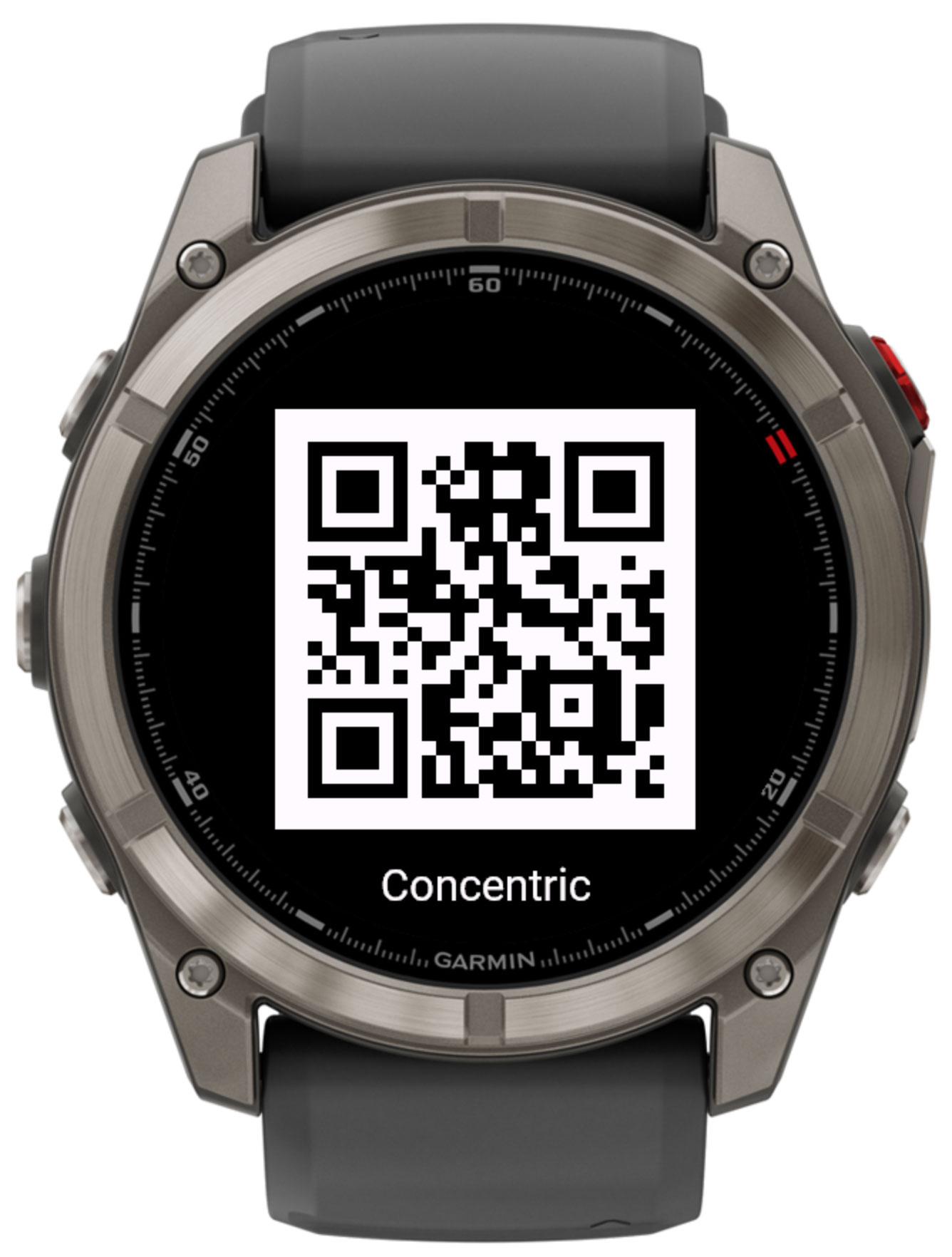
Accessible from the app's on-watch settings menu, where available. Scan the QR code with your phone to open this page, where you can find support information and purchase an unlock code.

Buy the unlock code
Unlock code

Concentric uses an unlock code to verify your purchase. To enter or view your code:

  1. Open Garmin Connect IQ on your phone.
  2. Navigate to My device → Apps → Concentric → Settings.
  3. Enter your code in the 🔑 Unlock code field.
  4. The Verification status field updates automatically once the watch has an internet connection.

You can also manage settings via Garmin Express on your desktop computer.

Privacy Policy · Manage / unlink purchase


© 2022-2026 VeshchiyOleg